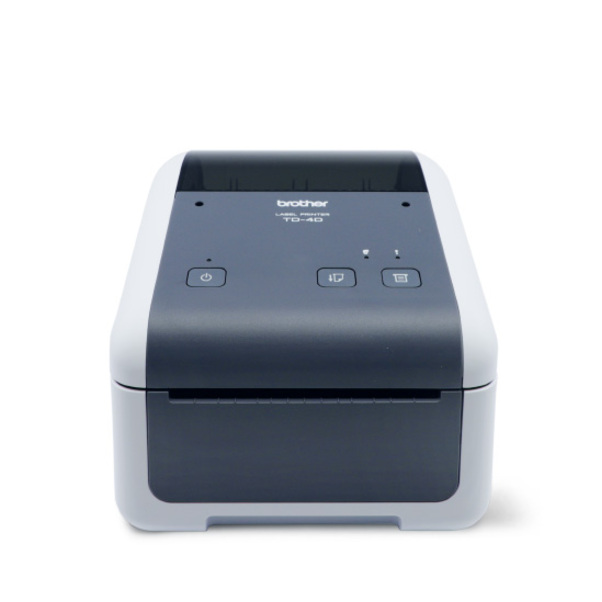
Brother TD4520DN Desktop Direct Thermal Printer - Monochrome - Label Print - Fast Ethernet - USB - Serial - LED Display Screen - 118.11" (3000 mm) Print Length x 4.10" (104.10 mm) Print Width - 8 in/s (203.20 mm/s) Mono - 300 dpi - Raster, ESC/P, ZPL, CPC

BMS-TD4520DN BMS-TD4520DN
Call for price
Starting from
CAD 957.90 / EA
/
- +
Compare

Brother TD4520DN Desktop Direct Thermal Printer - Monochrome - Label Print - Fast Ethernet - USB - Serial - LED Display Screen - 118.11" (3000 mm) Print Length x 4.10" (104.10 mm) Print Width - 8 in/s (203.20 mm/s) Mono - 300 dpi - Raster, ESC/P, ZPL, CPC

Item Code: BMS-TD4520DN

Crop function

Ideal for creating shipping labels. Your A4 dispatch document is scanned and the barcode information is automatically processed. Individual labels are then printed from your TD-4520DN desktop label printer.

Seamless integration

To support integration, many printer command languages are supported. Including ZPL II emulation, Raster, CPCL emulation enabling integration into legacy systems.

Print from your Windows PC

Create customer labels using Brother P-touch Editor. Easily add your company logo or select from hundreds of built-in images, symbols, barcodes and frames. Also, link to excel data to batch print labels.

Network connectivity

Sharing the TD-4520DN is simple with the integrated network port. Increase your teams productivity with this network desktop label printer. Many users can share the printer in a variety of locations.

Manufacturer Brother Industries, Ltd

Description

Crop function

Ideal for creating shipping labels. Your A4 dispatch document is scanned and the barcode information is automatically processed. Individual labels are then printed from your TD-4520DN desktop label printer.

Seamless integration

To support integration, many printer command languages are supported. Including ZPL II emulation, Raster, CPCL emulation enabling integration into legacy systems.

Print from your Windows PC

Create customer labels using Brother P-touch Editor. Easily add your company logo or select from hundreds of built-in images, symbols, barcodes and frames. Also, link to excel data to batch print labels.

Network connectivity

Sharing the TD-4520DN is simple with the integrated network port. Increase your teams productivity with this network desktop label printer. Many users can share the printer in a variety of locations.

Specifications

UNSPSC Code

45101512

Application/usage

Desktop

Barcode Symbology Supported

Code 39

Brand

Brother

Category

Label Makers & Receipt Printers

Connectivity Technology

Wired

Depth

8.82" (224 mm)

Display Screen

Yes

Display Screen Type

Led

Ethernet

Yes

Ethernet Technology

Fast Ethernet

Height

6.10" (155 mm)

Language Emulation

Raster

Manufacturer

Brother Industries, Ltd

Manufacturer Part Number

TD4520DN

Manufacturer Website Address

http://www.brother.ca

Maximum Print Length

118.11" (3000 mm)

Maximum Print Resolution (dpi)

300

Maximum Print Width

4.10" (104.10 mm)

Media Type

Label

Operating System Supported

Windows 10, Windows 7, Windows 8, Windows Server 2003 & 2008 (32 & 64 bits), Windows Vista, Windows XP

Platform Supported

PC

Power Adapter Included

Yes

Print Color Capability

Monochrome

Product Model

TD4520DN

Product Name

TD4520DN Professional Network Desktop Label Printer

Product Type

Direct Thermal Printer

Recommended Use

Label Print

Serial Port

Yes

USB

Yes

Width

7.09" (180 mm)

Description

Crop function

Ideal for creating shipping labels. Your A4 dispatch document is scanned and the barcode information is automatically processed. Individual labels are then printed from your TD-4520DN desktop label printer.

Seamless integration

To support integration, many printer command languages are supported. Including ZPL II emulation, Raster, CPCL emulation enabling integration into legacy systems.

Print from your Windows PC

Create customer labels using Brother P-touch Editor. Easily add your company logo or select from hundreds of built-in images, symbols, barcodes and frames. Also, link to excel data to batch print labels.

Network connectivity

Sharing the TD-4520DN is simple with the integrated network port. Increase your teams productivity with this network desktop label printer. Many users can share the printer in a variety of locations.

Specifications

UNSPSC Code

45101512

Application/usage

Desktop

Barcode Symbology Supported

Code 39

Brand

Brother

Category

Label Makers & Receipt Printers

Connectivity Technology

Wired

Depth

8.82" (224 mm)

Display Screen

Yes

Display Screen Type

Led

Ethernet

Yes

Ethernet Technology

Fast Ethernet

Height

6.10" (155 mm)

Language Emulation

Raster

Manufacturer

Brother Industries, Ltd

Manufacturer Part Number

TD4520DN

Manufacturer Website Address

http://www.brother.ca

Maximum Print Length

118.11" (3000 mm)

Maximum Print Resolution (dpi)

300

Maximum Print Width

4.10" (104.10 mm)

Media Type

Label

Operating System Supported

Windows 10, Windows 7, Windows 8, Windows Server 2003 & 2008 (32 & 64 bits), Windows Vista, Windows XP

Platform Supported

PC

Power Adapter Included

Yes

Print Color Capability

Monochrome

Product Model

TD4520DN

Product Name

TD4520DN Professional Network Desktop Label Printer

Product Type

Direct Thermal Printer

Recommended Use

Label Print

Serial Port

Yes

USB

Yes

Width

7.09" (180 mm)

SEARCH ×

Search